0705722539 info@ripple.co.ke

Built for phone-first business
Your business documents,
simplified.
Create invoices, quotes, purchase orders, and delivery notes — professional documents, sent from your phone, paid instantly through Stripe or PayPal.
No card required
5 free documents every month
Works from any phone or browser
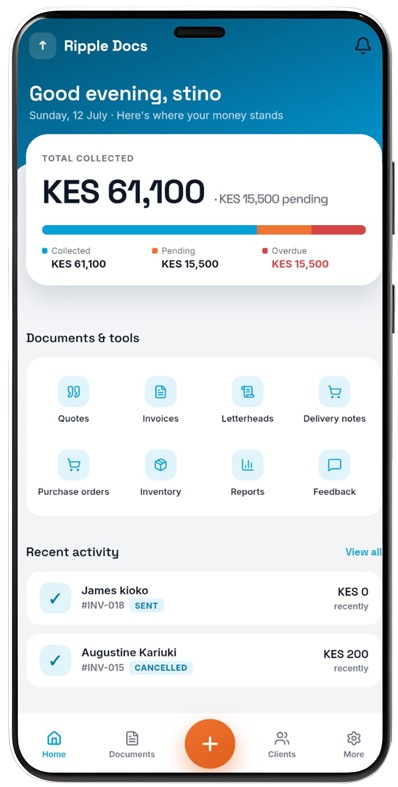
Real business situations
Every document, exactly when you need it
Business moves fast. Ripple Docs keeps up — create and send the right document in minutes, from wherever you are.
Client moment
"Can you send me a quote?"
Open Ripple Docs, add your line items, attach your logo. A professional quote PDF in their inbox in minutes — not hours.
Payment moment
Project done. Invoice and get paid.
Send the invoice with a Stripe or PayPal payment link. Your client pays online. You see it immediately.
Supplier moment
Goods on their way. Document it.
Create a purchase order or delivery note instantly. Proper paperwork every time — for your records and your client's.
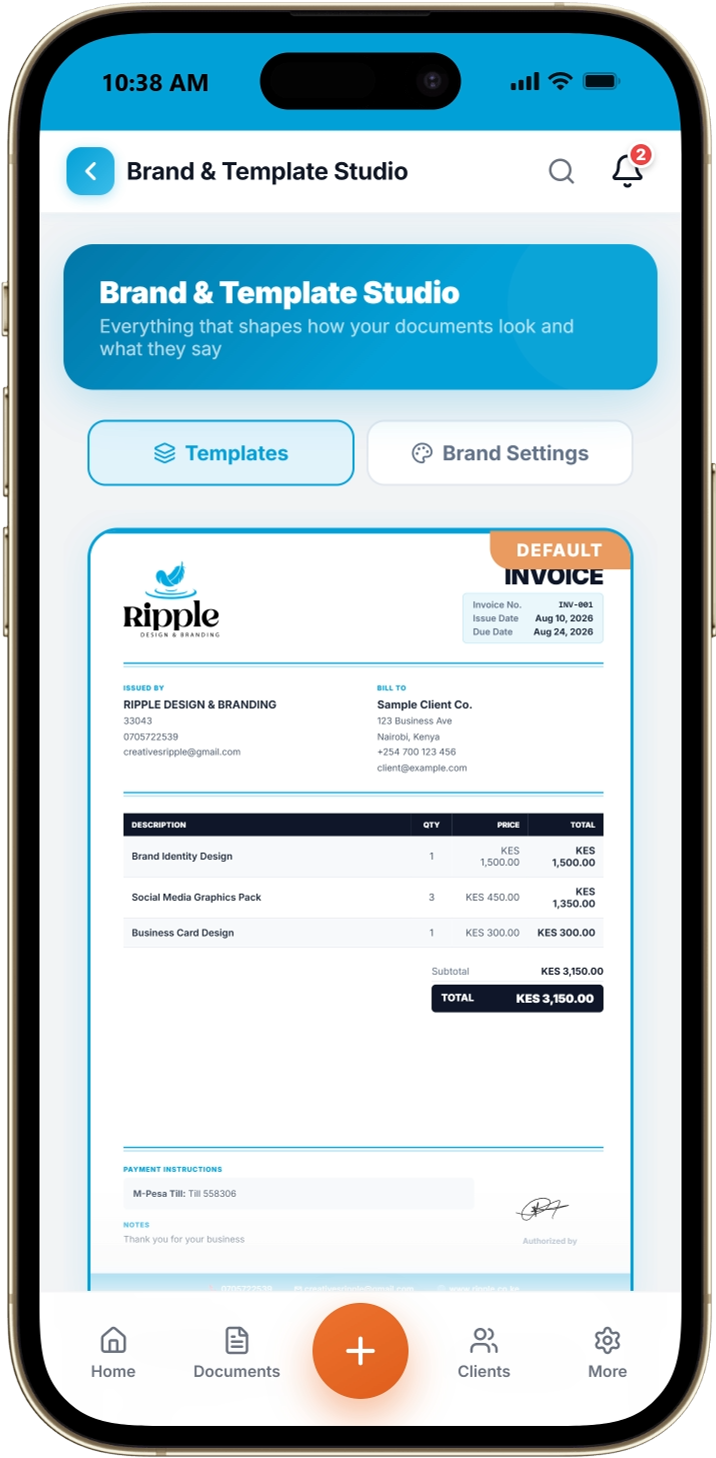
Documents that represent you
The document you send is your first impression.
A well-formatted invoice or quote signals that you run a proper business. Ripple Docs makes that easy — your logo, your brand, on every document you create.
21 professional templatesDifferent structures — sidebar layouts, dark headers, minimal lines, editorial styles. Not colour variants.
Share as PDF or payment linkSend the PDF via email or WhatsApp. Or share a payment link — client pays online, no downloads needed.
Track what's been paidPartial payments, full payments, payment reminders — see the status of every invoice at a glance.
6+
Document types in one app
21
Professional templates
$0
To get started — always free
∞
Documents on paid plans
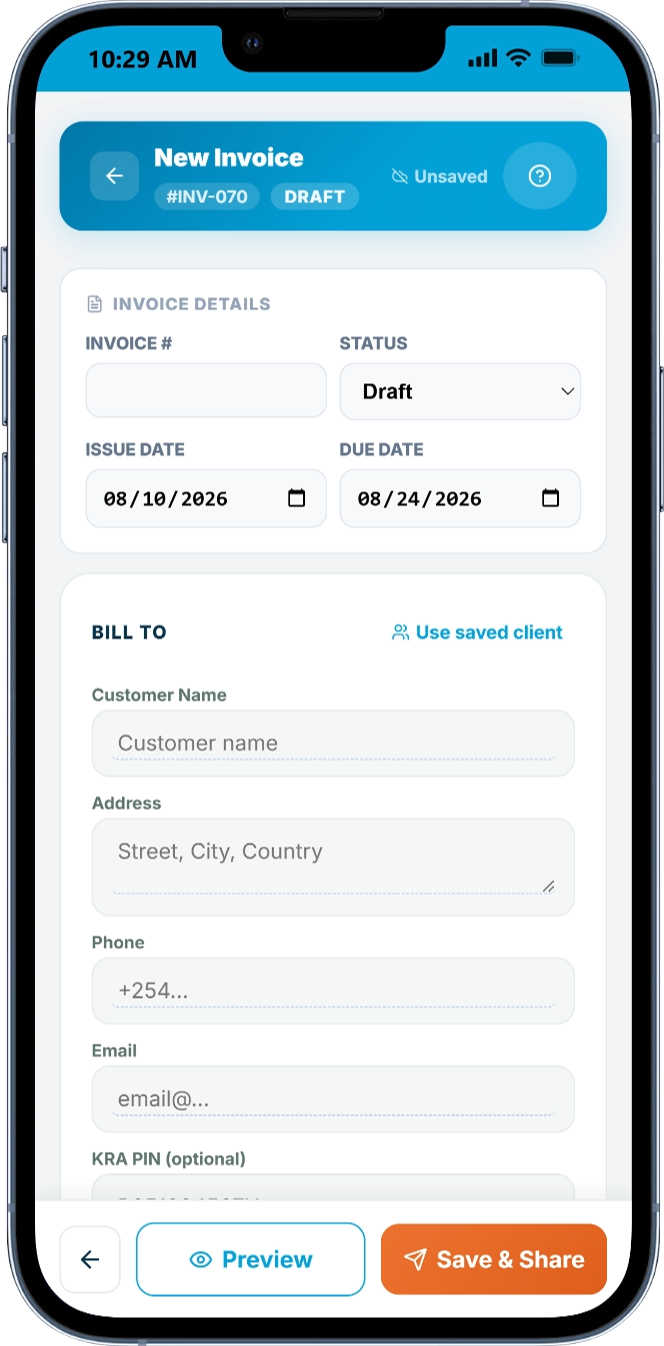
Get paid faster
Send the invoice. Your client pays from their phone.
No bank queues. No account numbers over WhatsApp. Attach a Stripe or PayPal payment link to any invoice — your client pays in seconds, you see it immediately.
Stripe & PayPal payment linksClient pays by card or PayPal. Funds go directly to your connected account.
Bank transfer & M-PesaYour bank details printed on every invoice. M-Pesa STK push for Kenyan clients.
Payment remindersSet automatic reminders for overdue invoices. No more chasing by hand.
Payment methods
Your client pays how they pay.
Stripe, PayPal, bank transfer, or M-Pesa — whichever works for your client, attach it to your invoice.
Stripe
Card paymentsSend an invoice with a Stripe payment link. Client pays by card. Funds go directly to your Stripe account.
PayPal
Online paymentsPayPal payment links on your invoices. Clients pay from their PayPal account or by card — internationally familiar.
Bank transfer
Your details on invoiceYour bank account details appear on every invoice automatically. Client transfers directly to you.
M-Pesa
KenyaM-Pesa STK push built in for Kenyan clients. PIN prompt on their phone. Payment lands in seconds.
Six document types
Every document your business needs
Invoice, quote, credit note, purchase order, delivery note, and letterhead — all in one place, all on your phone.
Invoice
Itemised invoice with sequential numbering, VAT toggle, payment link, and partial payment tracking.
Free + ProQuote
Send a professional quote before work starts. Client accepts, you convert to invoice in one tap.
Free + ProCredit Note
Issue when a refund is due or a discount applied after invoicing. Keeps your records clean.
Pro onlyPurchase Order
Formalise what you're ordering from a supplier. Required by most procurement departments.
Pro onlyDelivery Note
Document what you delivered and when. Protects you if a client claims goods weren't received.
Pro onlyLetterhead
Branded headed paper for official correspondence. 4 designs, unlimited creation on all plans.
All plansFrom real users
Businesses that run from their phones
★★★★★
"I used to spend Sunday evenings building invoices in Google Docs. Now I send them from my phone the moment a project wraps. Clients pay faster because the invoice arrives faster."
★★★★★
"The purchase order feature alone is worth it. Our suppliers now take us seriously — they see a proper PO come through and process it the same day."
★★★★★
"I'm a consultant. My office is wherever I am. I created a quote on my phone during a client call and sent it before I left the room."
Pricing
Start free. Upgrade when you're ready.
No trial periods. No surprises. Free forever — upgrade to unlock more documents and document types.
Prices in USD · Pay by card or PayPal
Free
$0/ forever
Invoices and quotes. 5 documents every month.
- 5 documents per month
- Invoices & quotes only
- 2 templates · 1 letterhead
- Manual payment recording
- 1 seat
- "Made with Ripple Docs" on documents
Most popular
Pro
$9/ month
or $90/yr — 2 months free
Unlimited documents. Every document type. 2 seats.
- Unlimited documents · 2 seats
- All 6 document types & 21 templates
- Stripe, PayPal, M-Pesa & bank transfer
- Payment links on every invoice
- Reports, CSV exports & reminders
- No "Ripple Docs" branding on documents
For teams
Business
$25/ month
or $250/yr — 2 months free
Everything in Pro. Built for growing teams.
- Everything in Pro
- 6 seats · $4 per extra seat
- Team roles & permissions
- Client statements & client ledger
- Priority support
No auto-renewal on M-Pesa. Pay for 30 days or 365 days — access stays active until it expires. PayPal plans renew automatically.
Questions
Common questions about Ripple Docs
Is Ripple Docs really free?
Yes — the Free plan is free forever, not a trial that expires. You get 5 documents every month, invoices and quotes, and 2 templates. No card required. Documents carry a small “Made with Ripple Docs” line until you upgrade.
How do my clients pay me?
On Pro and Business, every invoice can carry a payment link. Your client pays by card through Stripe, through PayPal, by bank transfer, or by M-Pesa if they are in Kenya. The payment is recorded against that invoice automatically. On the Free plan you record payments manually.
Do I need to install an app?
No. Ripple Docs runs in any browser, on any phone, tablet or computer. There is nothing to download and nothing to update.
What documents can I create?
Six types: invoices, quotes, credit notes, purchase orders, delivery notes and letterheads. The Free plan covers invoices and quotes. Pro unlocks the rest, along with all 21 invoice templates. Letterheads can be created without limit on every plan.
What currency is the pricing in?
Prices are in US dollars. Pay by card or through PayPal, and your provider handles any conversion from your local currency. If you are in Kenya, see the M-Pesa edition for Shilling pricing.
Am I locked into a contract?
No. PayPal subscriptions renew automatically until you cancel them from PayPal. On M-Pesa you pay for 30 or 365 days up front — there is no auto-renewal and nothing to cancel, and access stays active until it expires.
Built by Ripple
Ripple Docs is made by Ripple Design & Branding, a creative studio in Nairobi. We also design logos and brand identities, build websites, and set up AI chatbots and automations. Based in Kenya? See the M-Pesa edition. Otherwise start a project with us.
Get started
Your office doesn't have to be a desk.
Create your first document free — no card, no setup, no waiting. Your business looks professional from the first document you send.
Ripple Docs · Works from any phone or browser · No app store needed